Promotional codes can be used to offer a discount or extras goods and services to guests. Promotional Codes are only available to visitors of the RezEasy Online Reservation System.
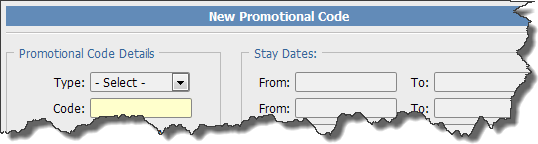
Type: Select the type of promotional code you want to add.
Membership: This type of code has different discounts depending on the number of rooms booked using the code The default bands for rooms booked are 1 to 3, 4 to 6, 7 to 10 and 11 or more. The main administrator for RezEasy sets these bands.
Discount: This type of code applies the same discount to the reservation irrespective of the number of rooms booked using the code.
Code: The promotional code. Codes must be unique (RezEasy will not allow duplicates).
Code is Active: Check this box if the code is active (can be used). The code will only be active within any other parameters that are
set. For example From
and To
dates.
From: The first date that the promotional code can be used. This is the date the reservation is made not the date of the actual stay. Applicable to Discount codes only.
To: The last date that the promotional code can be used. This is the date the reservation is made not the date of the actual stay. Applicable to Discount codes only.
Apply As: How you want to apply the promotional code.
% Discount: As a percentage of the room cost. This percentage is applied to the room rate only and does not apply to any extras the guest adds to the reservation.
Fixed Amount: As a fixed amount deducted from the total room cost. This is applied to the room rate only and does not apply to any extras the guest adds to the reservation.
Discount: The discount to apply (either a percentage or fixed amount as defined in Apply As
). For Membership code you enter
4 discount amounts (see Membership
above).
Format: The format that the discount will take.
Cash Discount: This applies the discount to the room rate either as a percentage or a fixed amount (see
Apply As). When applied as a fixed amount the discount is deducted from the room rate for the first night. When applied as a percentage the discount is applied to each night.Goods or Services: Guests will see a message informing them that goods and services of a certain value (ie. the discount you enter) will be provided on arrival.
Max Rooms: The maximum number of rooms that can be booked using this code. Applicable to Discount codes only.
Stay Dates: Only reservations where the Arrival and Departure are within one of the From
To
periods will qualify for
the discount. Leave all the From
& To
blank to allow any Arrival and Departure dates. Applicable to Discount codes only.
From: Start date for this period.
To: End date for this period.
When a promotional code is applied to an online reservation and the Format
of the code is a Cash Discount
, the discount is deducted from the room
rate when the guest checks-in. Therefore, the room rate posted to the guest folio will include the discount. Any deposit taken at the time of booking does not include
the discount. Therefore, if your terms of booking include a penalty for cancellation or no-show, and the deposit matches that penalty amount, you will still receive
the full deposit for reservations where a promotional code is used.
If the Format
of the code is Goods or Services
it is your responsibility to ensure that the guest receives goods or services to the value of
the code. It is not possible for RezEasy to assign anything automatically.
Whenever a promotional code is used the details will always be shown in the confirmation email messages sent when the reservation is made. It will also be added to the notes associated with the reservation.